WoW guild Discord template: channels, roles and layout
A WoW guild Discord template you can copy: categories, channels and roles for a small guild, a raiding guild, or one Discord running more than one game.
In this post
A good WoW guild Discord has 5 to 7 categories: Start here, News, Raiding, Guild, Recruitment, Officers and Voice. Rank roles decide who sees what, and members pick their own raid role and class from a button. Copy the layout below for your guild size, and have it ready before WoW Forever launches on 4 November.
Launch week is when new members arrive, and they decide in the first minute whether your Discord is somewhere they understand. A short, predictable layout does more than any bot. Pick the tab that matches your guild, copy the channel list, then work through the checklist at the end.
What channels does a WoW guild Discord need?
Fewer than you think: one place to start, one place for news, one for signups, and somewhere to chat. Every extra channel is one more place a message gets lost. Add channels when a conversation keeps getting buried, not before.
Small guild
For a social or levelling guild of up to about 15 people, with the odd dungeon night. Six text channels and one voice channel is plenty.
START HERE
  #welcome          rules, ruleset and faction, how to join in game
NEWS
  #announcements    officers post, everyone reads
GUILD
  #general
  #leveling-and-dungeons
  #signups          dungeon nights and, later, raids
OFFICERS
  #applications     private
VOICE
  Guild
Skip the officer category until you have more than two officers. Put the rules in #welcome rather than a separate channel.
Raiding guild
For a guild with set raid nights. The Raiding category is where the bot posts, so keep chat out of it.
START HERE
  #welcome          rules, ruleset and faction, raid nights
  #rules-and-policy loot rules, main and alt policy
  #pick-your-roles  role buttons
NEWS
  #announcements
RAIDING
  #signups          one sheet per raid night
  #roster-call      who is playing what
  #raid-recaps      kills, loot and attendance after each raid
  #drop-outs        can't make it, swap requests
  #strategy         boss notes, consumables
GUILD
  #general
  #leveling-and-dungeons
  #professions
RECRUITMENT
  #apply-here       public: how to apply
  #applications     private: officers discuss
OFFICERS
  #officer-chat     private
VOICE
  Raid
  Dungeons
Multi-game
For a guild that keeps playing another version of WoW while it starts Forever. Shared channels stay at the top. Each game gets its own category, and a role picker lets people hide the game they don’t play.
START HERE
  #welcome
  #pick-your-roles  includes a role per game
COMMUNITY
  #general
  #off-topic
FOREVER           visible to the Forever role
  #forever-announcements
  #forever-signups
  #forever-roster-call
  #forever-recaps
ERA               visible to the Era role
  #era-announcements
  #era-signups
  #era-recaps
OFFICERS
  #applications     private
  #officer-chat     private
VOICE
  Forever raid
  Era raid
  Hangout
Keep the channel names prefixed by game. “Which signups?” is the first question a two-game Discord gets.
How should the categories be laid out?
In the order a new member needs them: start, news, then the game, then chat, with private categories at the bottom. People read a sidebar top to bottom, so put the rules where they look first.
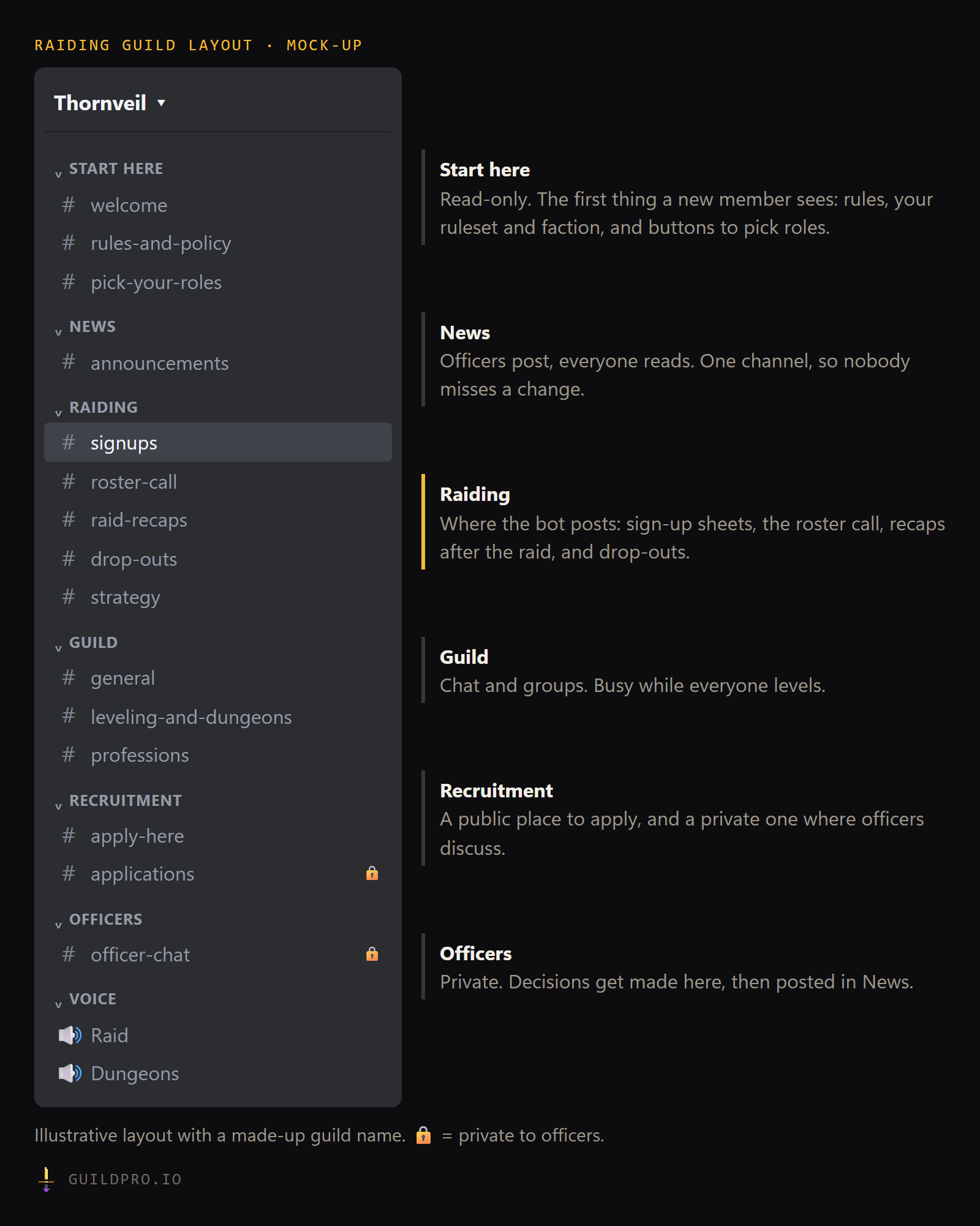
Three settings make this work:
- Start here and News are read-only for everyone except officers. Discussion of an announcement goes in #general.
- Raiding is mostly bot posts. Sheets and recaps get buried under chat, so keep conversation in #strategy or #general.
- Applications and officer channels are private. An applicant should never be able to read the discussion about them.
What Discord roles should a WoW guild have?
Two kinds: rank roles you assign, and self-assigned roles members pick themselves. Rank roles control which channels people can see. Self-assigned roles are labels that help raid leaders and let people opt in to pings.
| Role | Type | What it does |
|---|---|---|
| Guild Master | Rank | Server owner or co-owner. Everything. |
| Officer | Rank | Sees officer and application channels, posts in News |
| Raider | Rank | Sees Raiding, gets raid pings |
| Member | Rank | Sees the guild channels |
| Trial | Rank | Same as Member, so officers can spot them |
| Guest | Rank | Friends and alts of other guilds. Start here and General only. |
| Tank, Healer, DPS | Self | Raid role, for pings like “need a healer” |
| Class roles | Self | Optional. Useful for class channels or class leads |
| Forever, Era | Self | Multi-game only. Shows or hides each game’s category. |
Keep rank roles few. Every rank is a permission set you have to maintain. For who does what among officers, see our guild officer roles guide.
Can members pick their own roles?
Yes, with a role picker: a bot message with buttons or a dropdown. Members press a button to take a role and press again to drop it. Use it for self-assigned roles only. Rank roles should stay in officers’ hands.
Where should the bot post?
In the Raiding category, one channel per kind of post. A signup sheet, a recap and a drop-out are different things read by different people at different times.
In GuildPro, an admin picks a channel for each kind of post on the Bot page:
Signups, Rosters, Recaps, Loot, Announcements, Drop-outs, Applications and Surveys.
The Applications channel has to be private or the change is refused. The same page
sets up welcome messages and role pickers with
buttons or a dropdown. /raid and /rostercall post in the channel where you type
them. Choose where the bot posts.
The bot needs four permissions in every channel it posts to: View Channel, Send Messages, Embed Links and Attach Files. To hand out roles, its own role must sit above those roles in Server Settings → Roles. Check both before launch evening.
How do I set up one Discord for two games?
Give each game its own category and its own role, and route each game’s posts to its own channels. Shared chat stays shared. Signups and recaps never mix.
This matters on Forever because characters only group with players on the same ruleset, and Forever has no realms, per Wowhead’s write-up on rulesets. A guild with members on Forever and on another version is really two raid groups that share a chat room. The layout should say so.
In GuildPro an admin adds Forever from Settings, which creates a separate Forever
guild page with its own roster, signups and attendance under the same Discord. It
does not inherit the first game’s channels, so pick them on the Forever page’s
Bot page. Slash commands follow the channel: /raid typed in a Forever-only
channel posts a Forever sheet. Add Forever to your guild.
When should the Discord be ready?
Before name reservation opens on 27 October, and certainly before launch on 4 November. Per Wowhead’s roadmap, raids don’t open until 9 December, so you have time to grow the Raiding category. The Start here, News and Guild categories need to work on day one.
Tick these off as you go. The button copies the list for your officers.
- Create the categories in order: Start here, News, Raiding, Guild, Recruitment, Officers, Voice
- Make Start here and News read-only for everyone but officers
- Write #welcome: ruleset, faction, raid nights, how to get an invite in game
- Pin the loot rules and the main and alt policy in #rules-and-policy
- Create rank roles: Guild Master, Officer, Raider, Member, Trial, Guest
- Make #applications and #officer-chat private to officers
- Post a role picker for Tank, Healer and DPS
- Choose a channel for each kind of bot post
- Check the bot can post in every channel it uses
- Turn on a welcome message for new members
- Post a roster call so people pick a main and alts
- Create a Discord invite link that never expires for your recruitment post
What are the common Discord mistakes for a new guild?
Too many channels, chat in the signup channel, and roles nobody maintains.
- Twenty channels on day one. Half will be empty in a month. Start lean.
- Signups buried in chat. One reply under a sheet and the sheet scrolls away. Lock #signups to bots and officers if you need to.
- Rank roles that drift. Someone leaves the guild in game and keeps Raider in Discord. Review the role list after every raid week for the first month.
- No pinned rules. When the first loot argument happens, you want to link a post, not write one. Our main and alt policy template is a good first pin.
For everything else to settle before launch, work through the WoW Forever guild checklist. When the layout is ready, GuildPro’s signups and rosters fill the Raiding category for you.
FAQ
What channels does a WoW guild Discord need?
At minimum: a welcome and rules channel, announcements, signups, general chat, a levelling or dungeon channel, and a private applications channel. Raiding guilds add recaps, drop-outs and an officer channel.
What Discord roles should a WoW guild have?
Rank roles (Guild Master, Officer, Raider, Member, Trial, Guest) that control which channels people see, plus self-assigned roles for raid role and class that people pick from a button.
Should a guild make a new Discord for WoW Forever?
Not if the same people are playing. Add a Forever category to the Discord you have, with its own announcements, signups and recaps channels. In GuildPro each game gets its own guild page and its own channel routes.
How do I stop new members asking which channel to use?
Put one read-only Start here category at the top, greet new members automatically, and give them buttons to pick roles. The GuildPro bot can do the welcome message and the role buttons.