Raid recap Discord bot: every raid, posted without typing
A raid recap in Discord after every raid: bosses, wipes, loot and who said yes but never came, built from the addon's record. Nobody types it up.
In this post
GuildPro builds a raid recap from the addon’s record the moment the night is
uploaded: bosses, wipes, loot, and who signed up but never came. Posting it to
Discord takes one click on the Recaps page, or /recap in any channel. Nobody types
anything up.
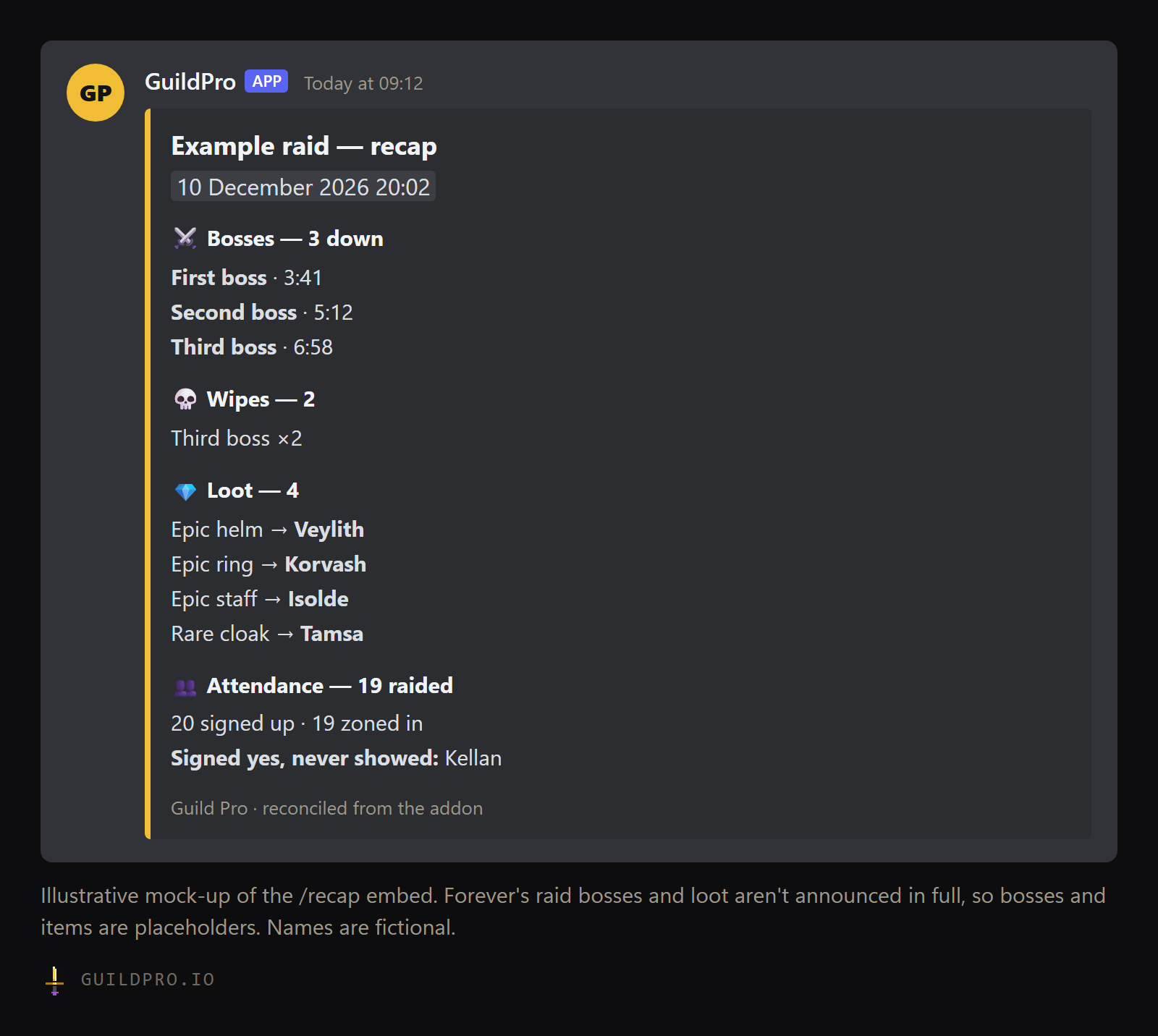
/recap posts. Placeholder bosses and items, fictional names.What is a raid recap bot?
A bot that posts what happened in last night’s raid, so the guild doesn’t depend on an officer writing it up. A good recap answers the questions people ask the next morning: what died, what dropped, who got it, and who was missing.
Most recaps are written by hand, which means they’re late, short, or don’t happen. The officer who raided until midnight is the one person who doesn’t want to spend another half hour on a summary. A recap bot only works if it already knows what happened, which is why it needs a record of the raid, not just the signup sheet.
What does a GuildPro recap show?
Bosses killed and how long each took, wipes per boss, every drop with who received it, and a line comparing signups with who zoned in. That last line is the one officers end up reading first.
| Section | What it shows |
|---|---|
| Bosses | Each kill, with its fight length |
| Wipes | A count per boss, when there were any |
| Loot | Who received what. The first 12 items, then a count of the rest |
| Attendance | How many signed up and how many zoned in, naming anyone under “Signed yes, never showed” |
If everyone who signed up came, the recap says so. A raider who offered several characters on a flexible sheet and played one isn’t listed as a no-show.
On the website, the same recap also puts each drop under the boss whose loot table lists it, and has filters by item quality. If the night was matched to a Warcraft Logs report, it adds a damage and healing table and a Hall of fame & shame with awards for the night.
How does the recap get made without anyone typing it?
The GuildPro addon records the raid while you play, and the free companion app uploads it when the game saves. GuildPro then ties the raid to its signup sheet and builds the recap.
- During the raid, the addon records boss pulls, kills, wipes, who is in the group, and loot. On WoW Forever, boss pulls come from the game’s own encounter start and end signals, so the addon doesn’t need the combat log.
- When the game saves, the record is written to disk. WoW only saves addon data
on
/reload, logging out or quitting. A/reloadafter the last boss is the habit to build. - The app uploads it within a few seconds of the save.
- GuildPro ties it to a sheet. It looks for a signup sheet starting within 12 hours of the raid, ties the best match, and closes it. That is what lets the recap name no-shows.
One raider with the addon and the app is enough. If two or three raiders run it, their uploads of the same night merge into one raid, which fills gaps if someone disconnects. Everything a recap shows is on the recaps docs page.
How do I post the recap to Discord?
Two ways: an officer selects Post to Discord on the Recaps page, or anyone types
/recap in a channel. They post the same night in two different shapes.
From the Recaps page
Officers and admins see Preview and Post to Discord on each recap.
- The recap goes as a picture card to your guild’s Recaps channel, set on the Bot page.
- The message has a Full recap button that opens the page, and a Warcraft Logs button when a log was matched.
- Loot you have hidden with the quality filter is left off the card.
- If the night has awards, you can pick which ones to include. Posting adds them to the winners’ trophy cases.
With /recap
Anyone in the server can run /recap. It posts in the channel where you type it.
/recaprecaps the most recent raid./recap kind:Dungeondoes the last dungeon run instead.- It posts a text embed, like the figure above: bosses, wipes, loot, attendance.
- It has no buttons, and it doesn’t need an officer.
The full options are on the /recap command page.
Is the recap posted automatically?
The recap is built automatically. Posting it is your choice, and it takes one click. GuildPro doesn’t post into your channel without someone asking. That keeps an officer in control of a night that went badly, and lets them choose the awards first.
In practice, the officer’s job after the raid goes from writing a summary to pressing
one button the next morning. If your officers would rather not do even that, anyone in
the guild can type /recap.
- Invite the GuildPro bot and connect it to your guild
- Pick a Recaps channel on the Bot page
- Install the companion app on at least one raider’s PC
- Ask two or three raiders to run the addon, so a disconnect doesn’t lose the night
- Post a signup sheet for every raid night, so the recap can name no-shows
- Type /reload after the last boss, or log out, so the game saves the record
- Check the app’s Activity list says the raid uploaded
- Open the Recaps page, select Preview, then Post to Discord (or run /recap)
What should a guild do with recaps?
Use them as the shared record of the night, so nobody argues from memory. A recap posted the morning after settles “who got the trinket” and “how many wipes was it” before anyone asks.
The no-show line is the part that changes behaviour. A count of missing raiders gets ignored. A name gets a conversation. Keep that conversation private, though. The recap names who didn’t come, and the officer follows up in a DM, not in the channel.
Over weeks, the same records feed the guild’s Attendance and Loot pages, so the recap isn’t a one-off post but the first page of the history. Our raid attendance tracker guide covers how that history credits the bench.
Raiders can also share their own night. The My recaps tab lists the raids one of your claimed characters was in, and Share makes a public link with only your attendance, your loot and the boss list. Nobody else’s name is on it.
What about WoW Forever raids?
Forever recaps work the same way, starting with the first raids on 9 December. Barrow Deeps, Hyjal Summit and Onyxia’s Lair all open that day, per Wowhead’s raids hub. Their bosses haven’t been announced in full yet, which is why the figure above uses placeholders.
Before then, run the addon on a guild dungeon night and check that the app’s Activity list shows an upload. Then you aren’t finding a setup problem on the first raid night.
GuildPro’s recaps, attendance and loot history are free for every guild, built from what the addon records. One raider running the companion app is enough to start. Download GuildPro.
For everything else your guild should settle before 4 November, see the WoW Forever guild checklist. If you’re still choosing a signup bot, read our Raid-Helper comparison.
FAQ
Does GuildPro post the recap on its own?
The recap builds itself from the addon's record as soon as the raid is uploaded. Posting it to Discord is one click on the Recaps page for an officer, or the /recap command for anyone.
What does a raid recap include?
Bosses killed with fight lengths, wipes per boss, loot and who received it, and how many signed up against how many zoned in, naming anyone who said yes and never showed.
Do I need Warcraft Logs for a recap?
No. The recap comes from the GuildPro addon. If the night is also matched to a Warcraft Logs report, the recap on the site adds damage, healing and awards.
Who needs to run the addon?
One raider with the addon and the free companion app is enough. More is safer: uploads of the same night merge into one raid.