A Raid-Helper alternative that knows your roster
Raid-Helper is good at signups. If you also want the bot to know your alts, credit the bench and check who showed up, here is what GuildPro does differently.
In this post
If you want a signup bot that also knows who your raiders are, GuildPro is a free Raid-Helper alternative built only for WoW. The sheet looks familiar. The difference is what happens around it: it knows each raider’s characters, builds the comp from your team roster, credits the bench, and checks the sheet against who actually zoned in.
Is Raid-Helper good?
Yes. Raid-Helper is a popular, flexible signup bot, and if all your guild needs is a sheet with buttons, it does that job well. It is quick to set up, works for many games, and most raiders have pressed its buttons before, which counts for a lot on a fresh server.
So this is not a “switch or suffer” post. It is about the jobs a WoW guild does around the sheet: knowing who is a main and who is an alt, picking the raid, crediting the bench, and checking who turned up. A general bot doesn’t try to do those, because it can’t see inside your raid. That is where GuildPro is different.
What does a WoW guild need from a signup bot?
It needs to answer “can this raid happen?” at a glance, and then remember who came. The first half is the sheet. The second half is what the officer used to do by hand in a spreadsheet after the raid.
On a fresh WoW Forever server, both halves matter. The first raids open on 9 December (Barrow Deeps at 10 players, Hyjal Summit at 20, Onyxia’s Lair at 40, per Wowhead’s raids hub), and nobody will know yet who reliably shows up. The guild that keeps an honest record from the first week has an easier time with loot, benching and recruiting later.
How does GuildPro compare with Raid-Helper?
Both post a signup sheet with buttons. GuildPro adds the WoW-specific work around the sheet, and it is free. Raid-Helper changes often, so check its own docs for its latest features.
| Raid-Helper | GuildPro | |
|---|---|---|
| Signup sheet in Discord with role buttons | Yes | Yes |
| Games | Many | WoW only |
| Templates and layout options | Lots | Three modes: one character each, flexible, splits |
| Raiders already know it | Most do | New to most |
| Knows each raider’s characters and alts | Not its focus | Yes, from claimed characters. Alts fold into one person |
| Compares the sheet with who zoned in | Not its focus | Yes, from the addon’s record of the raid |
| Credits the bench in attendance | Not its focus | Yes |
| Comp built from a standing team roster | Not its focus | Yes, Pull roster in the comp builder |
| Raid recap and loot record | Not its focus | Yes |
| Cost | See its site | Free for every guild |
If the left column covers everything you do, stay where you are. If you keep a spreadsheet next to your signup bot, the right column is that spreadsheet.
What does the GuildPro signup sheet look like?
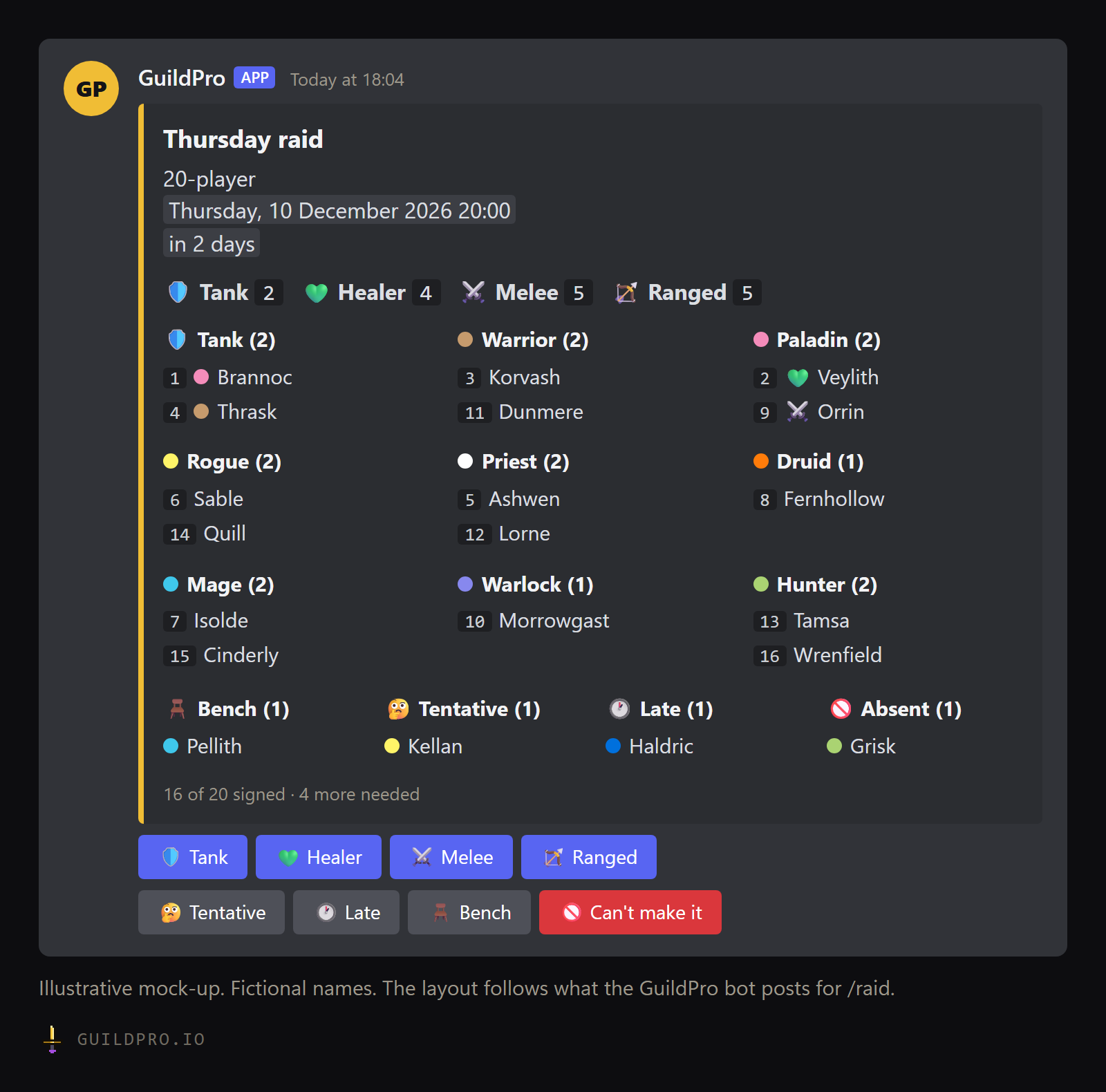
Role counts on top, tanks in their own column, everyone else grouped by class, and a footer that says how many more you need. The figure at the top of this post shows the layout.
A few details that come from running real raid nights:
- Tanks get their own column. Two tanks is the difference between a raid and no raid, so nobody should have to scan nine class columns to count them.
- Each name has a queue number in the order people signed up. It settles bench arguments without anyone scrolling back through the channel.
- The footer counts people, not characters. “16 of 20 signed · 4 more needed” means 16 humans, even on a flexible sheet where someone offered three characters.
- Bench, Tentative, Late and Absent are listed under the columns, so the officer sees who is in reserve.
When a raider presses Tank, Healer, Melee or Ranged, the bot asks privately which character they are bringing. Raiders who have claimed their characters pick from a list. Everyone else picks a class and spec and types the name. The full reference is in the /raid command docs.
How does it know who is an alt?
Characters claimed by the same account are one person. That one fact runs through everything: the footer counts people, the comp builder won’t seat the same person twice in one night, and attendance folds a night on an alt into the raider’s own row.
For nights where you want to choose between mains and alts, a flexible sheet lets raiders sign up on every character they could bring. They still take one seat, and the raid leader picks which. A split sheet goes one step further for guilds that run the same raid more than once a lockout.
Before launch, there are no characters to claim yet. That is what /rostercall is
for: everyone picks a main and up to five alts by class and spec, and the guild
roster starts from those answers. Our
main and alt policy guide covers the rules to
agree first.
What happens after people sign up?
The sheet becomes a comp, the comp becomes a roster post, and after the raid the sheet is checked against who actually came. This is the part a general signup bot leaves to you.
- Build the comp. The comp builder opens on the sheet. Pull roster seats each team’s rostered raiders who signed up, in their usual seats. Generate fills the rest. A Brings card shows which buffs the group has and which are missing.
- Post the roster. The roster card goes to Discord with Confirm my slot, Request a swap and I can’t make it buttons. The bench is named on the page before you post.
- Raid. The GuildPro addon records who is in the group at every boss pull, and the loot.
- Reconcile. After the companion app uploads the night, GuildPro ties the raid to its sheet, closes the sheet, and works out who raided, who was benched, who gave notice and who said yes and never appeared.
The bench rule is the one officers notice first: signed up and not seated counts as credited. We cover why in raid attendance tracking that counts the bench.
What can the bot do on its own?
It can tell you a raid night has no sheet, remind the channel before the start, DM people who haven’t answered a posted roster, and close the sheet after the pull. Every automation is off until an admin turns it on, and there are quiet hours and a daily cap. The details are on the automations page.
- Invite the GuildPro bot and connect it to your guild
- Set your raid nights on the Raid teams page
- Pick a Signups channel on the Bot page
- Post one sheet with /raid for a single raid night
- Ask raiders to claim their characters on GuildPro
- Install the companion app on one raider’s PC so the raid is recorded
- Compare the recap and attendance with your spreadsheet
- Decide which bot to keep
Should my guild switch?
Switch if you keep a spreadsheet beside your signup bot. Stay if you don’t. The honest test is the hour after the raid. If an officer spends it copying names from the sheet into a tracker and working out who no-showed, GuildPro does that part for you. If nobody does that job, Raid-Helper’s sheet is all you need.
You don’t have to switch on a raid night. Run one GuildPro sheet next to your current bot, let the addon record the night, and look at the attendance page the next day.
GuildPro’s signups, comp builder, attendance and recaps are free for every guild. One raider running the free companion app is enough to record a raid night. Download GuildPro.
For everything else your guild should settle before 4 November, see the WoW Forever guild checklist.
FAQ
Is Raid-Helper bad?
No. It is quick to set up, works for many games and most raiders already know its buttons. If a signup sheet is all your guild needs, it does that job well.
Can I use GuildPro and Raid-Helper in the same Discord?
Yes. They are separate bots. Some guilds keep their old signups running while they try GuildPro's on one raid night, then switch once they are happy.
Do raiders need a GuildPro account to sign up?
No. Anyone in your Discord can press the buttons. Raiders who claim their characters on GuildPro get a picker with their characters on it instead of typing a name.
What does the GuildPro signup bot cost?
Nothing. Signups, rosters, attendance, recaps and the bot are free for every guild of any size.
Does GuildPro work for WoW Forever?
Yes. Forever gets its own guild page, roster, signups and attendance, under the same Discord as any other game your guild plays.