Best Discord bot for a WoW guild, by the job it does
No single Discord bot is best for a WoW guild. Which bot covers signups, roles, welcomes, events and moderation, and which jobs Discord already does for free.
In this post
There is no single best Discord bot for a WoW guild. Pick by job. Raid signups need a signup bot (Raid-Helper or GuildPro). Welcomes and self-assigned roles come with GuildPro, or with a general bot such as Carl-bot or MEE6. Events and moderation are already built into Discord. Most guilds need one or two bots, not five.
Which bots does your guild need?
Answer four questions and you get a short list. It is a starting point, not a rule. Most guilds land on fewer bots than they expect.
- Raid guild: one signup bot that counts roles, plus Discord’s AutoMod and Events.
- Social guild: welcome messages and a role picker first, then Events and AutoMod.
- Small guild: Discord’s built-in tools may be enough. Add a bot when a job takes an officer’s evening.
What jobs does a WoW guild Discord need done?
Five: raid signups, welcomes, roles, events and moderation. Each one has a tool that does it well, and some of those tools are already part of Discord.
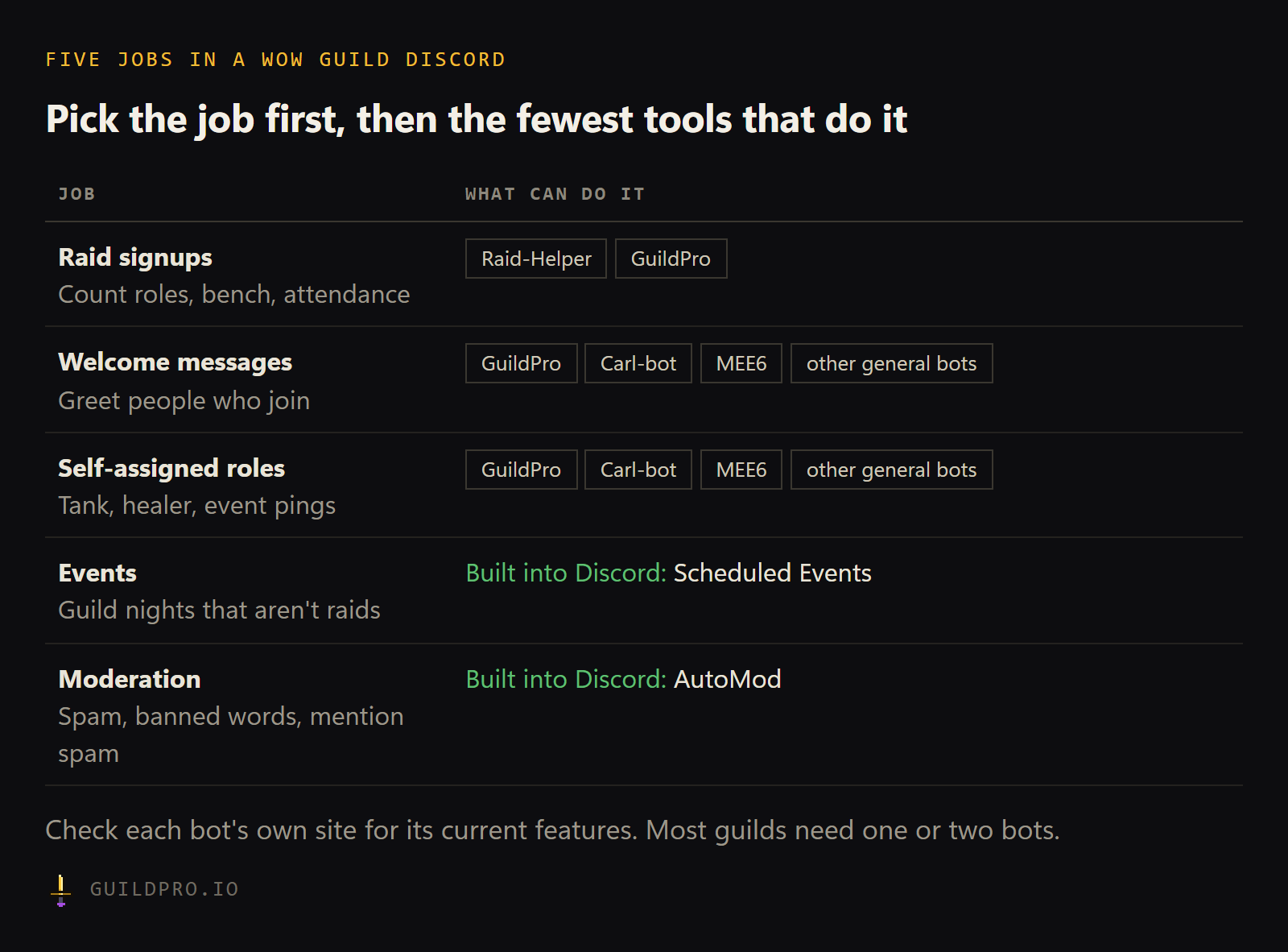
The mistake is starting from the bot list. A guild that adds every bot it has heard of ends up with five sets of permissions, overlapping welcome messages and a channel full of commands nobody remembers. Start from the job, then pick the fewest tools that cover it.
| Job | Options | Built into Discord? |
|---|---|---|
| Raid signups | Raid-Helper, GuildPro | No |
| Welcome messages | GuildPro, Carl-bot, MEE6 and other general bots | Partly (a system join message) |
| Self-assigned roles | GuildPro, Carl-bot, MEE6 and other general bots | Partly (onboarding, on Community servers) |
| Events | Discord Scheduled Events | Yes |
| Moderation and spam | Discord AutoMod, general bots | Yes |
Bots change often. For any third-party bot, check its own site for what it does today and what it costs: Raid-Helper, Carl-bot and MEE6.
Which bot is best for raid signups?
Raid-Helper and GuildPro are the two most WoW guilds look at. Both post a sheet with buttons that raiders press. The difference is what happens around the sheet.
Raid-Helper is popular, flexible and works for many games. Most raiders have pressed its buttons before, which counts for a lot when a new guild forms. If a sheet is all you need, it does that job well.
GuildPro is built only for WoW. Its sheet knows each raider’s characters, so alts
fold into one person and the footer counts people, not characters. Officers build the
comp from the team roster, the bench is credited in attendance, and after the raid the
sheet is checked against who actually zoned in. It is free for every guild. On
WoW Forever, /rostercall also collects everyone’s main and alts by class and spec
before anyone has a character to claim.
We wrote a longer, fair comparison in a Raid-Helper alternative that knows your roster. The short version: if an officer keeps a spreadsheet next to the signup bot, GuildPro does that spreadsheet’s job. If nobody does, either bot is fine.
Which bot should handle roles and welcome messages?
If you already use GuildPro for signups, it covers both. If not, a general bot such as Carl-bot or MEE6 does too. Fewer bots means fewer permissions to manage.
GuildPro’s welcome messages post in a channel, go by DM, or both. You write the text
once, with {user} for a mention of the newcomer and {guild} for your guild’s name.
The bot checks the member list every few minutes, so a greeting arrives within about
five minutes of joining. The setup is on the
welcome messages page.
Role pickers are a bot message with buttons or a dropdown. Members press to take a role and press again to drop it, up to 25 roles per picker. Use them for raid roles (tank, healer, DPS), for pings people opt into (dungeon nights, PvP calls) and for a “Forever” role in a Discord that runs more than one game.
General bots like Carl-bot and MEE6 do welcomes and roles too, along with many other things such as logging and levels. They are a good fit if you want those extras. Check their sites for the details.
A Discord server with Community turned on also gets an onboarding flow, with questions that hand out roles as people join. For a small guild, that plus a pinned rules post may be all you need.
Do I need a bot for guild events?
No. Discord’s built-in Scheduled Events handle one-off events well. Create one from the server menu, pick a voice channel or a place, and set a time. It shows at the top of the channel list, members mark themselves interested, and Discord notifies them when it starts.
Use Events for the nights that aren’t a raid: a levelling race, a camp night, a transmog contest. Our guild event ideas post has a list to start from.
For raids, a signup sheet is better than an event, because a raid needs roles counted, not just a list of who is interested. In WoW Forever the first raids open on 9 December: Barrow Deeps for 10, Hyjal Summit for 20 and Onyxia’s Lair for 40, per Wowhead’s raids overview. That is when the signup bot starts earning its place.
Which bot should moderate the server?
Start with Discord’s own AutoMod. It is in Server Settings, it blocks words and phrases you list, catches mention spam and suspected spam, and it costs nothing to switch on. Most guild Discords never need more.
A general bot can add more on top, such as logs of deleted messages. Only add one if a real problem shows up, because every moderation bot needs strong permissions. GuildPro’s bot does no moderation and never asks for kick, ban or Administrator.
How do I keep the bot count down?
One bot per job, and no two bots doing the same job. Use this list when you set up a new server, or tidy an old one before your guild moves to WoW Forever.
- Write down the five jobs: signups, welcomes, roles, events, moderation
- Mark which ones Discord already does for you (Events, AutoMod)
- Pick one signup bot and remove any second one
- Pick one bot for welcomes and roles, ideally one you already have
- Turn on AutoMod’s spam and mention filters
- Remove any bot nobody has used in a month
- Check each bot’s role sits above only the roles it should hand out
- Pin a short “how to sign up” post in the signups channel
Forever adds one rule worth remembering. A guild is one ruleset and one faction, and players on different rulesets or factions can’t group, as Blizzard’s starter guide on Wowhead explains. If your Discord holds friends on two rulesets, give each its own role and channels, so signups for one never land in front of the other.
GuildPro’s Discord bot does raid signups, /rostercall, welcome messages, role pickers
and reminders, free for every guild. Every automation is off until an admin turns it
on. Add the bot from your dashboard.
For everything else a guild should set up, start from the WoW Forever guild checklist.
FAQ
What is the best Discord bot for a WoW guild?
It depends on the job. For raid signups, Raid-Helper and GuildPro are the usual picks. For moderation and scheduled events, Discord's built-in AutoMod and Events cover most guilds without any bot.
How many bots does a WoW guild Discord need?
Usually one or two. A signup bot is the one most guilds can't do without. Add a general bot only for a job your signup bot and Discord's own tools don't already cover.
Can I run Raid-Helper and GuildPro in the same Discord?
Yes. They are separate bots and don't clash. Some guilds run one GuildPro sheet next to their old bot for a night before deciding which to keep.
Does GuildPro do welcome messages and role pickers?
Yes, for free. Welcomes can post in a channel, go by DM, or both, and role pickers use buttons or a dropdown. See welcome messages.
Do I need a bot for Discord events?
No. Discord has Scheduled Events built in. Anyone with permission can create one, and members who mark themselves interested get a notification when it starts.