WoW Discord guild chat: link it in WoW Forever
How to mirror WoW guild chat into Discord with Blizzard's own link: the player setting, the channel permissions, and the officer steps in game, in order.
In this post
- What is Blizzard’s Discord guild chat link?
- How does a player link their account?
- What does a Discord admin need to set up?
- How does an officer link the channel in game?
- Should Discord chat go to /guild or /discord?
- What does the link do, and what does it not do?
- What’s the full setup checklist?
- What should a WoW Forever guild check?
World of Warcraft can now mirror guild chat into a Discord channel, with Blizzard’s own account linking. Each player links their account in the game’s Social options, a Discord admin sets three permissions on one channel, and an officer links that channel from Guild Settings in game. It mirrors chat only. A guild bot still does the signups, rosters and attendance. Both checklists are below.
What is Blizzard’s Discord guild chat link?
It is a built-in link between your guild’s chat in game and one channel in your Discord, so people can talk to the guild without logging in. Blizzard announced it for both modern World of Warcraft and WoW Forever in Stay Connected in World of Warcraft with Discord, which has the full steps and screenshots.
Three people are involved, and the order matters:
- Each player links their own Blizzard and Discord accounts in game.
- A Discord admin sets the permissions on the channel that will carry guild chat.
- The guild leader, or an officer with the right permission, links that channel in game.
If any one of the three is missing, chat doesn’t flow. Most “it doesn’t work” reports come down to step 1: a player who hasn’t linked.
How does a player link their account?
Open Game Menu > Options > Social tab, and turn on Enable Discord Functionality. You must be logged into Discord to confirm it. That’s the whole player side.
It’s worth saying clearly in your Discord, because Blizzard’s post is plain about the consequence: messages from players who haven’t linked their account don’t show in Discord. Someone who skips this step can type in /guild all evening and nobody on the Discord side will see a word.
Post it once, pin it, and repeat it in your welcome message. New members won’t know it exists.
Which name shows up in Discord?
There are three display-name options: the default (last online character), the last online character name, or the Discord global name. Blizzard lists them in the same post.
| Option | What people see in Discord | Good for |
|---|---|---|
| Default | The last character you were online on | Most players |
| Last online character name | Your character’s name | Guilds that think in character names |
| Discord global name | Your Discord name | People with many alts |
For a raiding guild, character names are usually the most useful. Officers match people to characters all night, and a Discord name that has nothing to do with the character slows that down. If someone plays five alts, their Discord name may be clearer. Either way, ask people to be consistent.
What does a Discord admin need to set up?
Give the channel that will carry guild chat three permissions: Manage Channels, View Channel and Send Messages. Blizzard asks Discord admins to do this first, before anyone tries to link in game.
Our advice: make a new channel for it, such as #guild-chat. Don’t link your main
#general. A mirrored channel moves at the speed of in-game chat, and on a busy
evening it will bury anything else posted there. A separate channel also lets
people mute it without missing announcements.
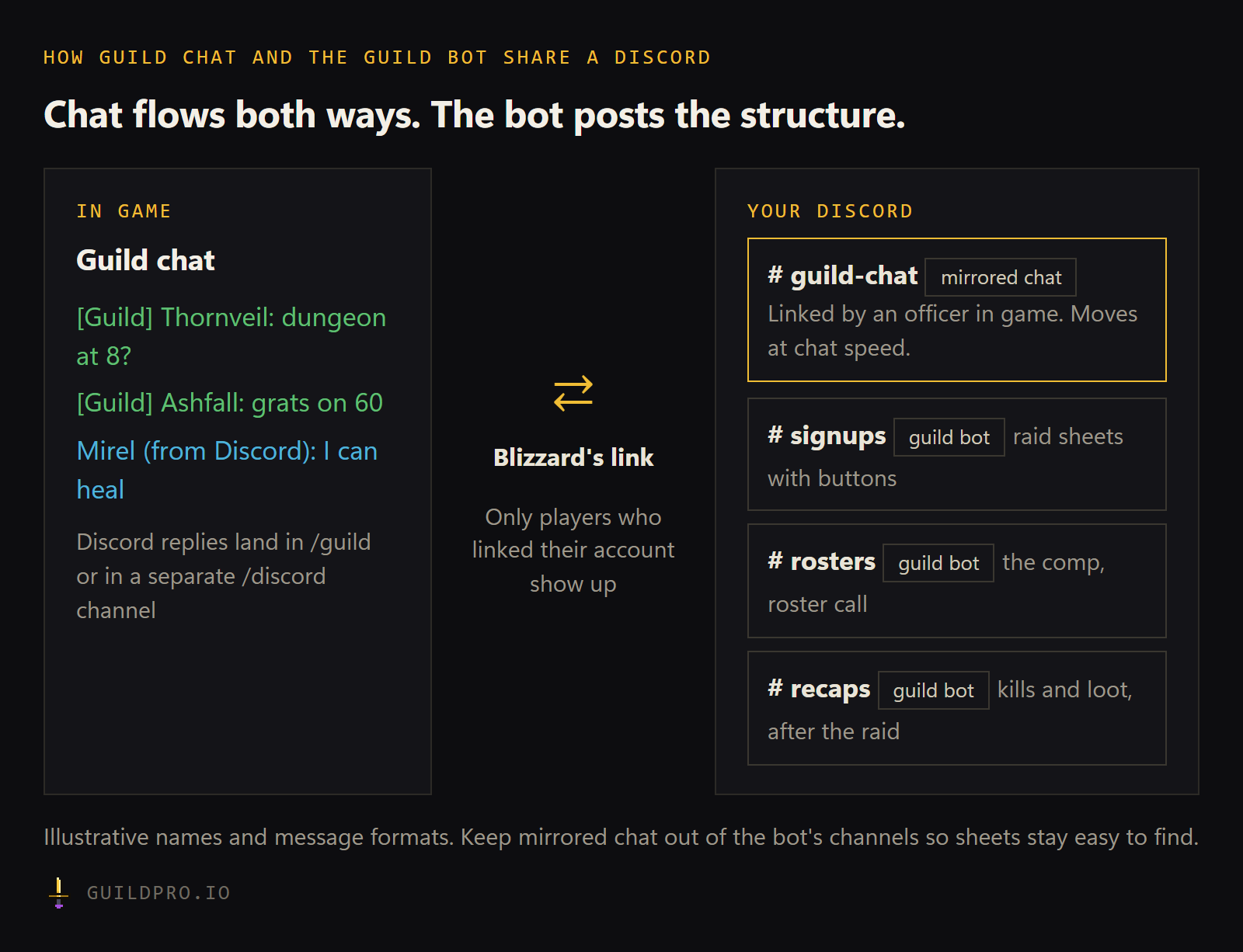
Keep it away from your bot channels too. Signup sheets, rosters and recaps need to stay easy to find, and a mirrored chat channel is the opposite of that. Our guild Discord template has a channel layout that leaves room for it.
How does an officer link the channel in game?
Press J for Guild & Communities, open the Roster tab, then Guild Settings, the Guild Control dropdown, and Discord Settings. Pick your server, pick a linkable channel, and select Link. Only the guild leader or an officer whose rank has the right permission can do it.
If your channel doesn’t appear in the list, go back to the admin step. A channel without the three permissions isn’t linkable.
Once it’s linked, test it with two people: one in game typing in guild chat, one in Discord replying. Both should have linked their accounts first.
Should Discord chat go to /guild or /discord?
Blizzard’s link can send Discord chat to normal /guild, or to a separate /discord channel in game. Which is better depends on how your guild talks.
| Discord chat in /guild | Discord chat in /discord | |
|---|---|---|
| In game | One conversation, everyone sees everything | Discord messages sit in their own channel |
| Feels like | The guild is all in one room | A side room for people who aren’t logged in |
| Best for | Small and social guilds | Large guilds where /guild is already busy |
| Watch for | Busy evenings get noisy | Players may not open the /discord tab |
A small guild usually wants /guild. The point of the link is that the officer at work can still say hello. A large guild with a busy /guild may prefer /discord, so in-game chat stays readable during a raid. Whatever you choose, tell people where to look.
What does the link do, and what does it not do?
It mirrors chat between the game and one Discord channel. It doesn’t post signup sheets, track who came to the raid, or keep a roster. That’s the job of a guild bot, and the two complement each other.
Think of it as two different jobs:
- Blizzard’s link carries conversation. “Anyone up for a dungeon?”, “grats on 60”, “who has a Cook?” all reach people on both sides.
- A guild bot handles structure. A raid sheet with buttons, role counts, a roster call, reminders before the raid, and attendance afterwards.
Chat is the wrong place for structure. A signup that lives in a chat log is gone in an hour. A sheet with buttons stays put and counts tanks for you. Our guide to Discord bots for WoW guilds goes through which bot covers which job.
GuildPro’s bot posts raid signup sheets, /rostercall for mains and alts, and
reminders, free for every guild. Its posts go to the channels you choose for
each kind of post, so keep them apart from the mirrored chat channel.
Choose where the bot posts shows how, and you
can add the bot from your dashboard.
What’s the full setup checklist?
Three short lists: one for every player, one for the Discord admin, and one for the officer in game. Tick them as you go. Ticks save in this browser, and the button copies the list for your guild’s Discord.
- Log into Discord on the same computer
- In game: Game Menu > Options > Social tab
- Turn on Enable Discord Functionality and confirm in Discord
- Check which display name you’ll show (default, character name, or Discord name)
- Type a test line in guild chat and ask someone in Discord if they saw it
- Admin: create a separate channel for guild chat, such as #guild-chat
- Admin: give it Manage Channels, View Channel and Send Messages
- Admin: keep bot channels (signups, rosters, recaps) separate from it
- Officer: press J, Roster tab, Guild Settings, Guild Control, Discord Settings
- Officer: pick the server, pick the channel, select Link
- Decide whether Discord chat goes to /guild or /discord, and tell the guild
- Test both ways with two linked players
- Pin a “link your account” post and add it to the welcome message
- Check after a week who still isn’t showing in Discord
What should a WoW Forever guild check?
Two things: that every member has linked their account, and that each Forever guild gets its own linked channel. Blizzard’s post covers both modern World of Warcraft and Forever by name, with screenshots of each, and the steps above are the ones it gives. If a menu moves in a later patch, trust the game, and check Blizzard’s post for an update.
The second point is a Forever rule. A Forever guild is one ruleset and one faction, and players on different rulesets or factions can’t group, per Blizzard’s starter guide on Wowhead. If your Discord holds two Forever guilds, or a Forever guild and one on another version of the game, give each guild its own linked channel. Mixing two guilds’ chat in one channel confuses everyone.
Chat is one piece of a guild’s first month. For the rest, open the WoW Forever guild checklist.
FAQ
How do I link WoW guild chat to Discord?
A Discord admin gives the channel Manage Channels, View Channel and Send Messages. Then the guild leader or an officer with the right permission presses J, opens the Roster tab, Guild Settings, Guild Control, Discord Settings, picks the server and channel, and selects Link.
Why don't my messages show up in Discord?
Messages from players who haven't linked their own account don't show in Discord. Each player turns it on under Game Menu > Options > Social > Enable Discord Functionality, while logged into Discord.
What is the difference between /guild and /discord in game?
Blizzard's link can send Discord chat to normal /guild, or to a separate /discord channel in game. /guild keeps one shared conversation; /discord keeps Discord chatter apart from in-game guild chat.
Does Blizzard's Discord link replace a guild bot?
No. It mirrors chat. A guild bot like GuildPro does signups, rosters and attendance. Most guilds will want both, in different channels.