GuildPro addon for WoW Forever: install in five minutes
Install the free GuildPro app and addons for WoW Forever on Windows: download, pair with Discord, tick Forever, restart. Plus fixes for the common snags.
In this post
- What does the GuildPro install put on my PC?
- How do I install GuildPro for WoW Forever, step by step?
- How do I know it’s recording?
- When does my data reach the website?
- Something went wrong. How do I fix it?
- Do I need the app, or can I paste exports instead?
- What should a guild do with this before launch?
Download the GuildPro app from /download, sign in with Discord,
tick WoW Forever on the “Put the addons in your game” screen, then quit and
restart the game. That’s it. The app is Windows only and free. After you play,
a /reload or a logout is what sends your data to the site.
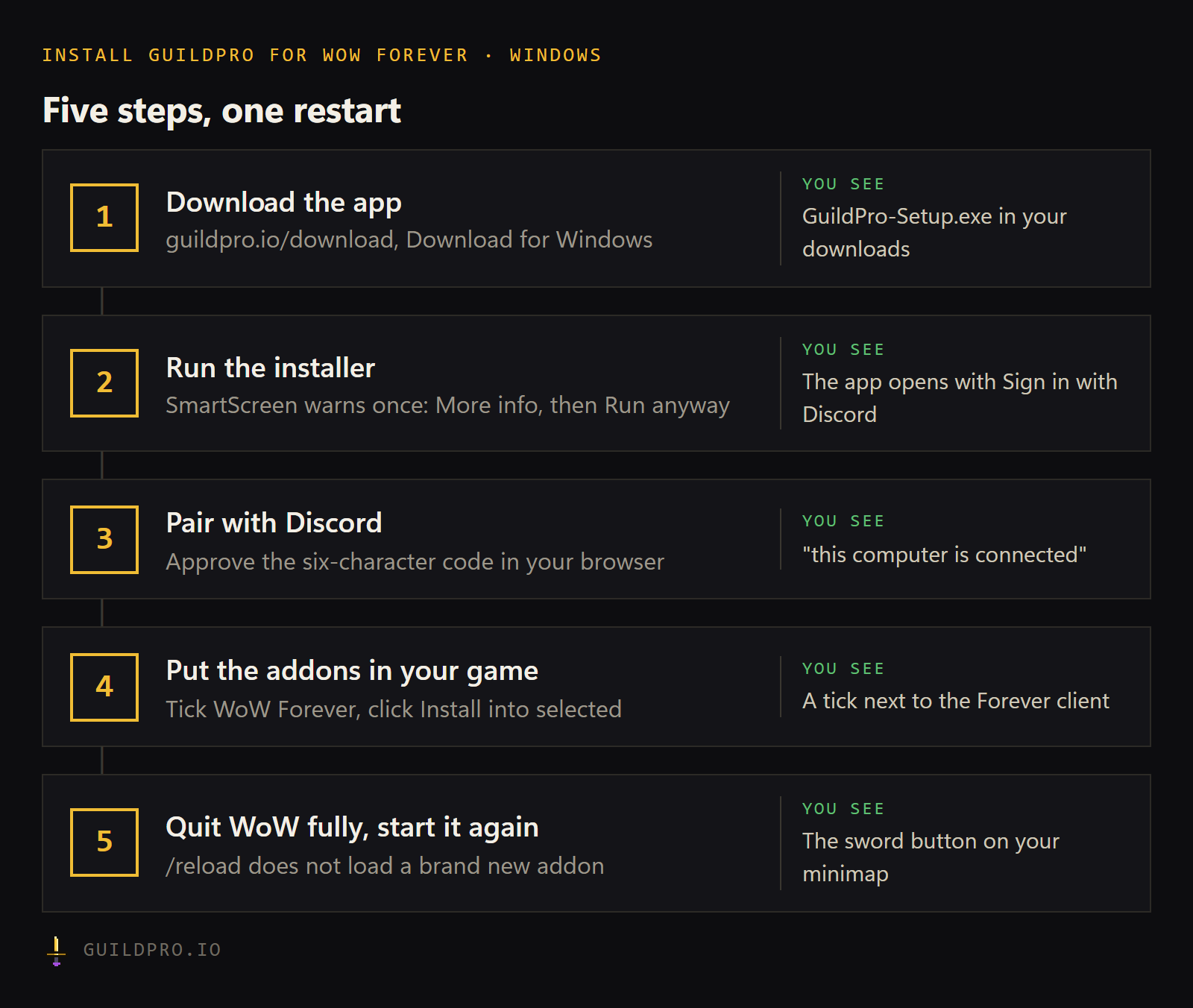
- Install WoW Forever from the Game Version menu in Battle.net
- Download the app from guildpro.io/download
- Run the installer (More info, then Run anyway on the SmartScreen warning)
- Click Sign in with Discord and approve the code in your browser
- Tick WoW Forever and click Install into selected
- Quit World of Warcraft completely and start it again
- Log in and check for the sword button on the minimap
- Type /reload after your first boss kill and check the app’s Activity list
What does the GuildPro install put on my PC?
One small Windows app and three addons. The app sits in your system tray. It puts the addons into every WoW client it finds, Forever included, then uploads what they record to guildpro.io after you play.
| Piece | What it records | Where it shows up |
|---|---|---|
| GuildPro addon | Boss pulls, kills, wipes, loot, who was there, your guild roster | Recaps, attendance, loot history |
| GuildPro PvP (PvPLedger) | PvP kills, deaths, assists, streaks, by zone and opponent | /pvp and your profile |
| GuildPro World (MobMetrics) | Mobs killed, jumps, distance travelled, time played and more | /world and your profile |
| Companion app | Nothing itself. It installs, watches and uploads. | The Activity list in the app |
None of the addons is a damage meter. Forever runs on the modern engine and doesn’t let addons read the combat log during play, so the GuildPro addon records boss pulls from the game’s own encounter start and end signals instead. Our guide to WoW Forever addons explains what that changes.
How do I install GuildPro for WoW Forever, step by step?
Five steps, and the only one that needs care is the last: restart the game fully. Here they are in order.
1. Get WoW Forever on your PC first
The app can only install into a client it can see. In the Battle.net app, select World of Warcraft, open the Game Version menu above the Play button, pick World of Warcraft: Forever and install it. Wowhead’s name reservation guide walks through the same menu.
2. Download and run the app
Go to /download and click Download for Windows. Run the installer. Windows SmartScreen will probably stop it with an “unknown publisher” warning, because the app isn’t code-signed yet. Click More info, then Run anyway. You only do this once.
3. Pair it with your account
Click Sign in with Discord in the app. It shows a code like XXX-XXX and opens
your browser at the pairing page with the code filled in. Check the code matches,
click Approve, and go back to the app. Its Activity list says “this
computer is connected”. You never type a password or copy a key.
4. Put the addons in your game
The app now shows Put the addons in your game, with one row per game version it found. Untick anything you don’t play, leave WoW Forever ticked, and click Install into selected. All three addons go in together.
5. Restart WoW completely
If the game was open, quit it fully and start it again. A /reload won’t pick up a
brand new addon. Log in to a character: chat says “Guild Pro loaded” and a sword
button appears on the minimap.
How do I know it’s recording?
Hover the sword on the minimap. The small dot on it tells you the state, and the tooltip spells it out.
| Dot | Meaning |
|---|---|
| Green | Recording a run |
| Amber | In a known dungeon or raid, waiting for the first boss pull |
| Red | In an instance the addon has no boss data for. Nothing will record. |
| No dot | Not in an instance |
Recording starts at the first boss pull, and attendance is marked at every pull.
Outside dungeons and raids the GuildPro addon records no raid data, but the PvP and
World addons keep counting. Type /gp to open the panel, or /gp status for a
one-line readout. The docs list every command.
On Forever the raid list is still provisional, since the raids don’t open until 9 December (per Wowhead’s raids hub). Until then, dungeon runs are what you’ll see recorded.
When does my data reach the website?
When the game saves its files, which is only on /reload, logout or quit. WoW
writes addon data to disk at those three moments and no others. The app checks the
files every two seconds and uploads a changed file within a few seconds.
So the habit to teach your raiders is short: kill a boss, type /reload. If the
game crashes before a save, everything since the last save is lost. That’s the
game’s rule, not the addon’s.
Uploading twice is safe. Every recorded fact has an id that comes out the same each time, so a second upload of the same night adds nothing. One raider with the app is enough to put a raid on the site, and more of them fill gaps.
The companion app is what makes the GuildPro addon hands-off: it installs the addons, puts them back if one goes missing, tells you when an update is out, and uploads after every save. It’s free and Windows only. Download GuildPro.
Something went wrong. How do I fix it?
Most problems are one of five things, and the app’s Activity list (bottom of the Settings tab) usually names which. Find what you see below.
| What you see | Why | Fix |
|---|---|---|
No sword button, /gp does nothing | The game was running during the install | Quit WoW completely and start it again |
| “no WoW folder” or “no World of Warcraft install found” | Your game isn’t in a folder the app checks | Settings, Watching, Add a WoW folder… and pick the folder that contains WTF |
| Boss is dead, site shows nothing | The game hasn’t saved yet | Type /reload |
| “not signed in — data stays local until you sign in” | The app is signed out | Sign in again. Nothing is lost. |
| “this computer is no longer connected — pair it again” | The connection was revoked | Click sign out, then Sign in with Discord and approve a new code |
| “that code expired — try connecting again” | The pairing code lasts 15 minutes | Click Sign in with Discord for a fresh code |
| “upload failed — this export is too large for the site to take” | Usually an old app version | Click Install the latest on the update banner, then Sync now |
A few more that come up:
- The upload worked, but your guild page is empty. You may not be a member of the guild on the website, or the guild is set to a different game. A Forever upload is only filed under a Forever guild. See wrong guild or realm.
- The dot is red in a dungeon. The addon doesn’t know that instance yet. Report the instance name and the id shown in the tooltip.
- A second clear joined the first run. Type
/gp newbefore the next pull.
The full walk-through, in order of how often each cause happens, is
data not showing up. If you’re still
stuck, click Sync now, copy the last ten lines of the Activity list, and ask in
the Discord. Leave out the claim code line from /gp status: it’s
private.
Do I need the app, or can I paste exports instead?
The app is optional. Without it, type /gp export in game, copy the text and
paste it on /import. The PvP and World addons have their own commands,
/pvpexport and /mmexport. That’s how a player on a Mac can still send data,
since the app is Windows only.
Pasting works, but it’s a chore after every raid, and a long history can be too large to paste. Most guilds get one or two officers on the app and let everyone else install it when they like.
What should a guild do with this before launch?
Get the officers installed this week, and post the steps in Discord for everyone else. Launch evening on 4 November is the worst time to troubleshoot a download. The install is one item in our WoW Forever guild checklist, and it belongs in your launch-night plan as a line that says “done by the weekend before”.
The checklist at the top of this page copies straight into Discord. Paste it in #announcements and pin it.
FAQ
Is the GuildPro addon free?
Yes. The app, the three addons and everything they record are free for every player and every guild.
Does GuildPro work on Mac?
The companion app is Windows only. Without it you can still copy an export out of the game with /gp export and paste it on the import page.
Does every raider need to install it?
No. One person in the raid running the addon is enough to record the night. More people running it is safe: their uploads of the same raid merge into one.
Why is the minimap button missing after I installed?
The game was running during the install. Quit World of Warcraft completely and start it again. A /reload does not load a brand new addon.
Can I install it before WoW Forever launches?
Yes. The app installs into the Forever client as soon as it finds it, including the beta client, so you can be set up before 4 November.