Discord event signups for WoW guild nights that aren't raids
Discord event signups for WoW dungeon nights, battlegrounds, socials and Faire trips: role slots, class icons, waitlists, reminders and groups in one post.
In this post
For WoW guild nights that aren’t raids, post one Discord event with sign-up buttons and let the bot handle the list. A social needs three buttons and nothing else. A dungeon night wants Tank, Healer and DPS slots, the character each person is bringing, a waitlist and groups. GuildPro’s event sign-ups do both from one form, and every extra is off until you switch it on.
Why do non-raid events need sign-ups?
Because “who’s up for dungeons tonight?” in chat gets six thumbs and two people at the portal. A sign-up turns interest into a list with a time on it, and a list is what lets someone build groups before everyone logs in.
It matters more in WoW Forever right now. Dungeon kill XP was raised by 50% on 7 November, per Wowhead’s news post, so repeat runs are worth it while levelling. And Forever has nine new dungeons on top of the classic ones, from Hall of Thanes at 13 to Shaper’s Terrace at 58 to 60, per Wowhead’s dungeon overview. A guild dungeon night is the easiest regular event to run, and the one that most needs groups made fairly. Our event ideas post has plenty more to fill the calendar.
How do you post an event sign-up in Discord?
Open Events in your guild’s sidebar, give it a name, a type and a time, and press Create and post. The bot posts it to your announcements channel, or a channel you pick, and can add it to Discord’s own Events list too.
The types are Social, PvP, Dungeon run, Tournament, Race, Contest, World boss, Guild meeting and Other. Each gets its own emoji on the post. The basic post has:
- The time, shown in each reader’s own clock, and a “in 2 days” countdown
- Where, if you set it (“Booty Bay docks”)
- Details, a few lines of text
- Going, Maybe and Can’t make it buttons
- An Add to calendar link
- The list of who’s going and who’s a maybe, updated on every press
People can change their answer any time. That’s it for a social. Everything below is under More options, and each part is off until you turn it on.
What can an event sign-up do beyond Going and Maybe?
Role slots, a character with class and level, a waitlist, questions, a close time, reminders, a check-in, a role ping and groups. Turn on only what the night needs.
| Option | What it does |
|---|---|
| Spots | A cap on how many can go |
| Role slots | Replaces Going with Tank, Healer and DPS buttons, each with a count |
| Ask which character | After pressing, people pick a claimed character, or a class and a typed name. The list shows each one with its class icon and level |
| Waitlist when full | People past the cap wait in press order. When someone drops, the next person moves up and gets a DM |
| Questions | Up to 3, answered when signing up |
| Signups close at | Locks the buttons at a time you choose |
| DM reminder | A DM to everyone going, 15 minutes to 1 day before |
| DM again at the start | A “get on for…” DM when it begins |
| Check-in | A Here button that opens 10 to 60 minutes before |
| Ping a role | Mentions one Discord role when it posts. Never @everyone |
| Groups | By role, random or by hand, at a size you set |
On Forever, the name box asks for first name and surname, because invites need both. If someone types only a first name, GuildPro looks it up in the guild roster your addon uploaded and uses the full name for invites, as long as there’s exactly one match.
How do you set up each kind of guild event?
Start from the night, not the options. These are the settings we’d use for the events Forever guilds run most.
Dungeon night
- Type: Dungeon run
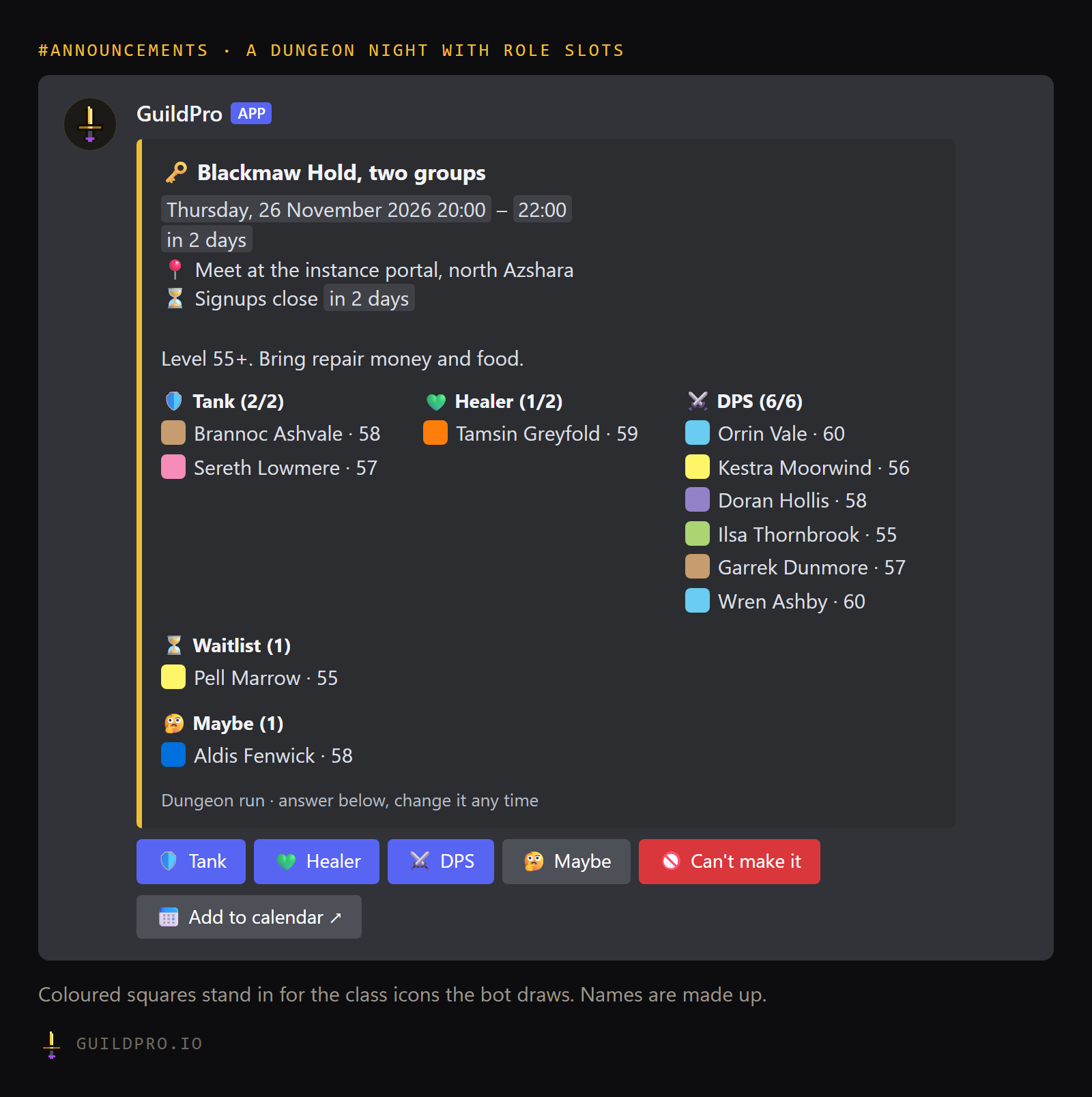
- Role slots: Tank 2, Healer 2, DPS 6 for two groups
- Ask which character: on
- Waitlist: on
- Groups: By role, size 5
- DM reminder: 1 hour before
- Ping: @Dungeon nights
By role puts one tank in each group, then one healer, then fills with DPS.
Battleground night
- Type: PvP
- Spots: however many you queue with
- Ask which character: on
- Check-in: opens 15 minutes before
- Groups: Random, at your party size
- Ping: @PvP
Darkspear Islands, Forever’s new 15v15 battleground, is a good anchor for the night.
Social
- Type: Social
- Where: the meeting spot
- Nothing else
A fishing contest or a guild photo wants three buttons, not a form.
Darkmoon Faire trip
- Type: Social, or Other
- Where: wherever the Faire is that month
- DM again at the start: on
- Repeat: Every month, same weekday, if your guild makes it a habit
Duel tournament
- Type: Tournament
- Check-in: opens 15 minutes before
- Groups: size 1, with Bracket ticked, checked-in only
- Record the winners at the end with Post results and close
The Darkmoon Faire is worth a word. The first Forever Faire was in Elwynn Forest for a week from 9 November, per Wowhead’s Darkmoon Faire post, and its world buffs don’t work in raids in Forever. They still work in the open world, which makes the Faire a social trip rather than raid prep.
How does the bot make groups?
It splits the people going into groups of the size you set, and posts the groups under the event. Open Manage on the event, pick the mode, and press Make and post.
- By role puts one tank in each group first, then healers, then fills with DPS, so groups are as even as they can be and never more than one apart in size.
- Random shuffles everyone and cuts them into groups.
- By hand uses the group numbers you type in Details. Anyone you didn’t number goes in a last group, so nobody drops off the post.
Tick Checked-in only to group just the people who pressed Here. For a tournament, a size of 1 with Bracket ticked posts round-one matchups instead.
When the groups are up, Manage can also copy the /inv lines for every seated
character, ready for a macro.
What else does an event host get?
A Manage panel with the list, messages, invites and results, plus a way to let non-officers run events.
- Message the attendees. Up to 3 messages a day per event, to everyone going, plus the waitlist or maybes if you tick them.
- Change the time or place. Edit the event, and with Tell everyone ticked the bot posts the change under the event and DMs the people going.
- Record winners. For contests, races and tournaments, results post with 🥇, 🥈 and 🥉 and close the event.
- Repeat it. Weekly, monthly on a date, or monthly on a weekday, posted 1 to 7 days ahead. Our recurring raid signups post covers how that fits around raid nights.
- Event hosts. An admin ticks Discord roles under Event hosts, and anyone with one of those roles can create and run events without being an officer. It’s checked live, so removing the role in Discord removes the power at once.
Events also show on your guild’s calendar next to raid nights, and they post to the announcements channel you set on the Bot page (see channel routes).
GuildPro’s event sign-ups are free for every guild: role slots, class icons, waitlists, reminders, check-in, groups and results, all from one form, with each extra off until you want it. Set up your guild, then open Events in the sidebar.
For everything else a Forever guild should have running before the raids open on 9 December, see the WoW Forever guild checklist.
FAQ
How do I post an event signup in Discord for my WoW guild?
In GuildPro, open Events in your guild's sidebar, fill in a name, type and time, and press Create and post. The bot posts it to your announcements channel with Going, Maybe and Can't make it buttons.
Can event signups have tank, healer and DPS slots?
Yes. Set role slots under More options and the Going button becomes Tank, Healer and DPS buttons, each with its own count. When a role is full, people go on the waitlist and get a DM when a seat opens.
Can the bot split people into dungeon groups?
Yes. Pick By role, Random or By hand and a group size, then Make and post. By role spreads tanks and healers one per group first.
Who can create events?
Officers and admins, plus anyone holding a Discord role the admin ticked under Event hosts. Everybody in the guild can answer.
Do event signups count toward raid attendance?
No. Events are for nights that aren't raids. Raid attendance comes from raid signup sheets and the addon's record of the raid.