Discord class roles for a WoW guild: a set that works
Discord class roles for a WoW guild: which roles to make, class colours, what the roles unlock, and a button or dropdown picker members use themselves.
In this post
A good set of Discord class roles for a WoW guild is three small pickers: raid role, main’s class, and pings for the events people want to hear about. Give class roles their class colours in Discord, let members pick their own, and keep rank and channel-access roles for officers to hand out. GuildPro posts the pickers as buttons or a dropdown, because its bot can’t see emoji reactions.
Why give members class and role roles in Discord?
So the server knows who plays what without anyone asking. A raid leader short a healer can ping @Healer. The member list shows the guild’s makeup in class colours. And a new member picks roles in their first minute, which tells you they read the channel.
Most guild Discords overdo it. Thirty roles for every spec and profession look thorough and then nobody updates them. Three questions that matter every week beat ten that don’t. Our Discord template covers the channel layout these roles sit in.
Which class and role roles should a WoW Forever guild make?
A raid role (several allowed), a main’s class (one only) and a few opt-in pings. Forever has nine classes. The Skyborne are a race, not a class, and new race and class pairs like Undead Paladin and Dwarf Shaman mean both factions can now field every class, per Wowhead’s list of new combinations. So the class list is the same for Horde and Alliance guilds.
Raid role
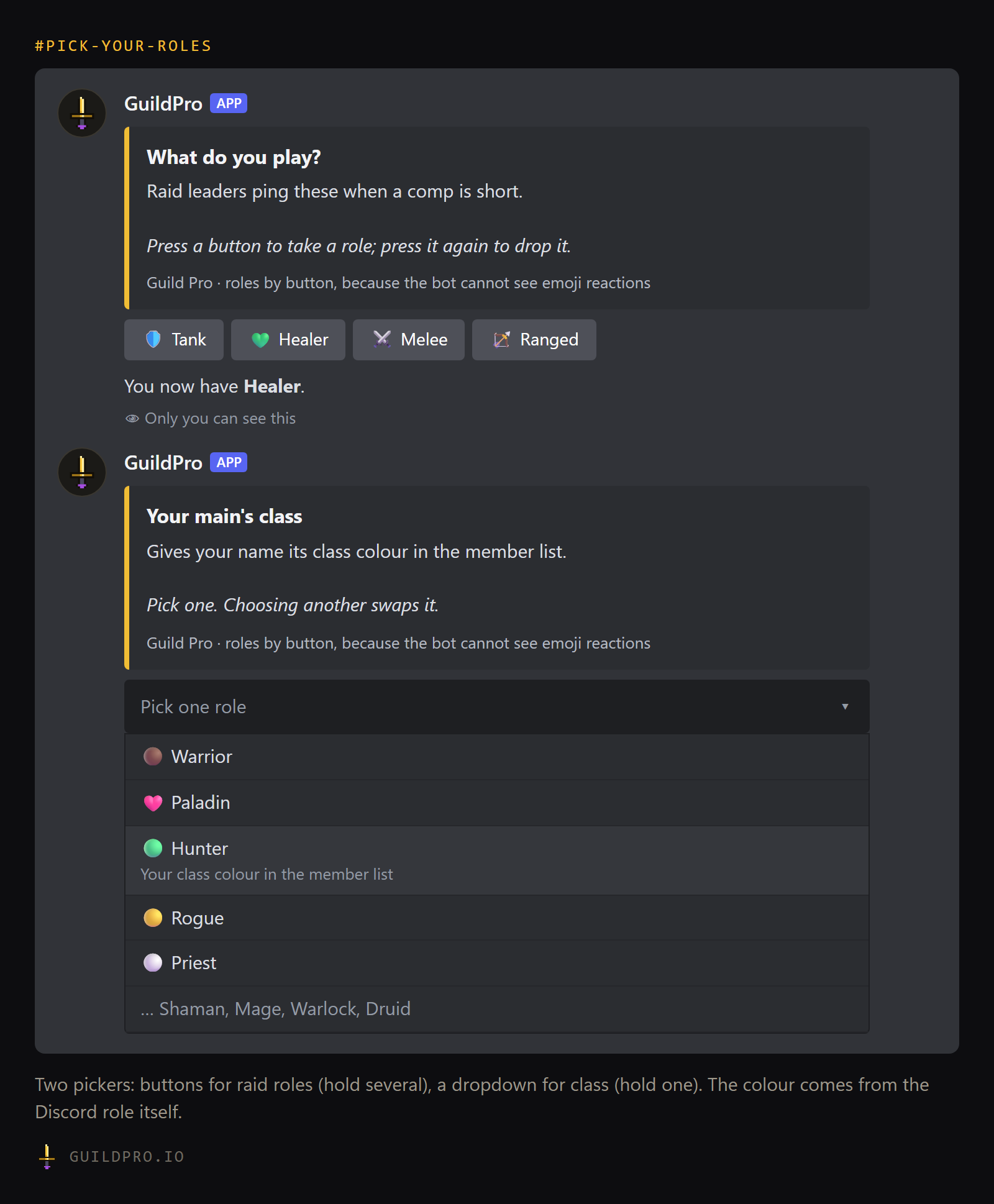
Buttons. Members may hold several.
| Label | Emoji | Description |
|---|---|---|
| Tank | 🛡️ | |
| Healer | 💚 | |
| Melee | ⚔️ | |
| Ranged | 🏹 |
A Druid who tanks and heals takes both. These are the roles a raid leader pings when the comp is short.
Main’s class
Dropdown. One only, so choosing another swaps it.
| Label | Emoji | Role colour |
|---|---|---|
| Warrior | 🟤 | #C79C6E |
| Paladin | 🩷 | #F58CBA |
| Hunter | 🟢 | #ABD473 |
| Rogue | 🟡 | #FFF569 |
| Priest | ⚪ | #FFFFFF |
| Shaman | 🔵 | #0070DE |
| Mage | 🩵 | #69CCF0 |
| Warlock | 🟣 | #9482C9 |
| Druid | 🟠 | #FF7D0A |
The colour is set on the Discord role, not in the picker. The coloured emoji just help people find their class in the list.
Pings
Buttons. Members may hold several.
| Label | Emoji | Description |
|---|---|---|
| Dungeon nights | 🗝️ | Pinged when a dungeon night is posted |
| PvP | ⚔️ | Battlegrounds and world PvP |
| Socials | 🍻 | Fishing, races, the Faire |
| Alt raids | 🔁 | Extra runs for alts |
Opt-in pings are how you stop @everyone from being the only way to reach people.
Spec roles (Holy, Feral, Frost) are the one place to be careful. They change with dual spec and talent tuning, which is still moving in Forever (see Wowhead’s class guides), so they go stale fast. Raid role plus class covers what a raid leader needs from Discord. The spec for a given night belongs on the signup sheet.
Buttons or a dropdown: which picker should you use?
Buttons for short lists people hold several of; a dropdown for a list where they pick one. Both work the same for members: they press, they get the role, and a private reply says what changed.
| Buttons | Dropdown | |
|---|---|---|
| Best for | 2 to 10 options | Long lists, like 9 classes |
| How members use it | Press to take, press again to drop | Pick from the menu. Whatever is unticked is removed |
| Descriptions under each option | No | Yes |
| Layout in Discord | Rows of 5 grey buttons | One menu |
Each picker has a Members may hold several of these roles box. Leave it ticked for raid roles and pings. Untick it for class, so picking Mage swaps out Hunter instead of leaving both.
The bot can’t see emoji reactions, which is why GuildPro doesn’t do the old “react with a shield” message. Buttons and dropdowns reach the bot directly, and the reply tells the member exactly what happened (“You now have Healer.” or “Removed Melee.”), which a reaction never did.
How do you give class roles their colours?
In Discord, not in the bot. Open Server Settings, Roles, pick the role and set its colour. Use the class colours in the table above. A member’s name takes the colour of their highest coloured role, so put the class roles above the raid-role and ping roles if you want names in class colour.
Two things trip people up:
- The bot’s role must sit above every role it hands out. In the same Roles list, drag GuildPro’s role up. If it’s below, members see “Discord refused” when they press, with the reason spelled out.
- Rank colours win if they sit higher. If your Officer role is coloured and above the class roles, officers show in the officer colour. Decide which you’d rather see.
The bot permissions page covers Manage Roles, which the default install already includes.
What should class and ping roles unlock?
Pings, mostly. Channel access belongs to roles officers give out, not roles members pick for themselves. Anyone can press a picker button, so a self-picked role is a preference, not a permission.
| Role kind | Who gives it | Good for |
|---|---|---|
| Raid role, class | The member, from a picker | Pings when the comp is short, member list colours |
| Ping roles | The member, from a picker | Event pings without @everyone |
| Raider, Trial, Officer | Officers, by hand in Discord | Private channels, voice, the raid’s own channels |
| Event host | Officers, by hand | Running events in GuildPro without being an officer |
Inside GuildPro, Discord roles are used in three places:
- Event pings. When you create an event, Ping a role when posted mentions one role, for example @Dungeon nights. GuildPro won’t ping @everyone.
- Event hosts. On the Events page, an admin ticks the Discord roles whose holders may create and run events. It’s checked live, so taking the role away in Discord takes the power away at once.
- Absence leadership. The roles that may press Seen on absence cards.
Guild ranks in GuildPro (admin, officer, raider) are set in GuildPro, not read from Discord roles. So a member picking a role from a picker never changes what they can do on the guild’s GuildPro pages.
How do you post a role picker in GuildPro?
An admin builds it on the Reaction roles page, saves it and presses Post to Discord. The page is under Bot in your guild’s sidebar.
- Create the roles in Discord: 4 raid roles, 9 class roles, a few ping roles
- Give the 9 class roles their class colours
- Drag GuildPro’s role above all of them
- Build the Raid role picker: Buttons, several allowed
- Build the Main’s class picker: Dropdown, one only
- Build the Pings picker: Buttons, several allowed
- Post all three in one #pick-your-roles channel
- Point new members to the channel in your welcome message
- Press each button once yourself to check
For each picker you set a Title, a Channel, a Style and an optional Description, then one row per role with a Label, an optional Emoji and the Role. Emoji must be standard ones. Custom server emoji aren’t supported. Roles that sit above the bot’s role show as “(above the bot’s role)” and can’t be picked until you move the bot up.
Changing a picker later is safe. Edit, change it and Save, and the message already in Discord updates to match. Every press and every failure is logged under Recent activity on the Bot page, so “the button did nothing” has an answer. The step-by-step is on the reaction roles docs page.
GuildPro’s role pickers, welcome messages and event pings are free for every guild. Build the three pickers once, point new members at them in your welcome message, and your raid leaders can ping @Healer instead of @everyone. Set up your guild.
Once the roles are in, the rest of a new member’s first ten minutes is in Discord onboarding for a WoW guild. For everything else to settle before the raids open on 9 December, see the WoW Forever guild checklist.
FAQ
Should a WoW guild Discord have class roles?
Yes, if someone will use them. Class roles colour names in the member list and let a raid leader see the guild's makeup at a glance. Raid role and ping roles are the ones that get used every week.
Why use buttons instead of emoji reactions for roles?
GuildPro's bot can't see emoji reactions, so its pickers use buttons or a dropdown. They work the same way for members: press to take a role, press again to drop it.
How do I give class roles their colours?
In Discord, under Server Settings, Roles. Set each role's colour there, and the picker hands out the role with its colour. Drag the bot's role above the roles it hands out.
Can members give themselves officer roles with a picker?
Only if you put those roles in a picker, so don't. Self-pick is for class, raid role and pings. Ranks and channel access are given by officers.
How many roles can one picker hold?
Up to 25. A class picker needs 9, so there's room. Split big sets into two pickers so each one asks one question.